An examination may end when the final answer booklet is submitted, but for a university or examination authority, some of the most demanding work is only beginning.
Thousands of answer scripts must be collected, identified, scanned, distributed to evaluators, marked, moderated, verified, consolidated and finally converted into accurate results. When these activities depend heavily on physical movement, spreadsheets and disconnected systems, even a well-conducted examination can face delays during evaluation.
This is where an On Screen Evaluation System changes the workflow.
Instead of transporting physical scripts between examination centres and evaluators, a modern On-Screen Evaluation workflow converts answer booklets into controlled digital scripts that authorised examiners can evaluate through a secure interface.
But there is an important distinction.
A truly effective On Screen Evaluation System should not simply display scanned copies of answer sheets. It should manage the complete journey from scanning and allocation to marking, moderation, monitoring, marks consolidation and post-examination processing.
So, what should universities actually look for?
Let’s examine the features that make the difference between basic digitisation and efficient examination processing.
What Is an On Screen Evaluation System?
An On Screen Evaluation System is a technology-enabled examination workflow through which physical answer booklets are digitised and made available to authorised evaluators for electronic marking.
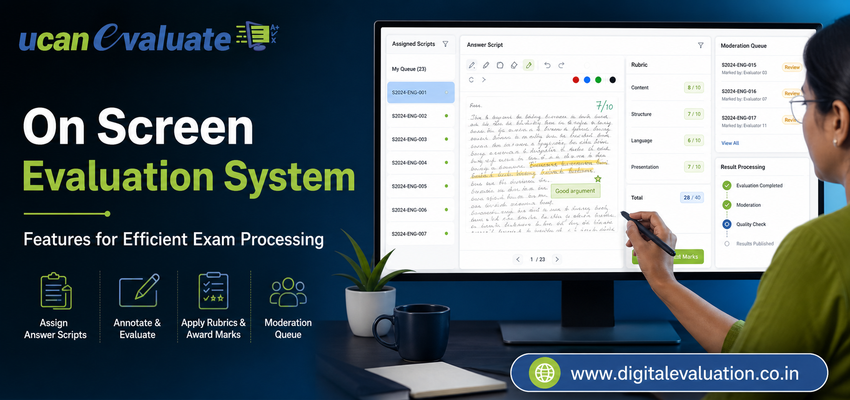
Evaluators can review responses, allocate marks, annotate scripts and complete assessment activities without repeatedly handling the original answer booklet.
A comprehensive Digital Evaluation System can additionally connect scanning, evaluator allocation, quality checks, moderation, marks processing and reporting.
This makes On Screen Marking one component of a much broader examination processing ecosystem.
The objective is not simply to replace a red pen with a computer screen. The real objective is to build an examination workflow that is easier to monitor, secure, scale and audit.
11 Must-Have Features of an Effective On Screen Evaluation System
1. High-Quality Answer Booklet Scanning
Every successful digital evaluation workflow starts with the quality of the scanned script.
Answer booklet scanning should produce clear, properly aligned and complete digital copies of physical answer sheets before an examiner begins evaluation.
The scanning workflow should support checks for problems such as:
• Missing pages
• Skewed or improperly aligned scans
• Unclear handwriting caused by poor image quality
• Incorrect booklet identification
• Unreadable barcodes or identifiers
• Duplicate or incomplete page capture
Accurate Scanning of Answer Sheets is more important than it may initially appear. A sophisticated On Screen Marking System cannot compensate for a missing page or an unreadable response.
Quality control should therefore happen before scripts reach evaluators.
2. Secure Script Identification and Candidate Masking
Evaluation should focus on the answer, not unnecessary candidate information.
A reliable On-Screen Marking System should support secure indexing of scanned scripts while limiting the candidate information visible to evaluators wherever the institution’s assessment policy requires anonymity.
This can help institutions create a more controlled evaluation environment while keeping scripts accurately mapped to the appropriate examination records in the backend.
Identification, indexing and access permissions should be built into the workflow rather than handled through separate spreadsheets or manual files.
3. Smart Examiner Allocation
Distributing thousands of scripts among evaluators manually can become one of the largest operational bottlenecks in Examination Processing.
A modern On Screen Evaluation System should allow examination administrators to allocate scripts according to predefined criteria such as subject, course, examiner group, workload or evaluation stage.
The platform should ideally support:
• Automatic or controlled allocation
• Reallocation when required
• Multiple evaluation workflows
• Examiner workload monitoring
• Subject-wise distribution
• Defined evaluation limits
This removes unnecessary administrative coordination and provides the examination cell with much better visibility into who is evaluating what.
4. Intuitive On Screen Marking Tools
Technology should simplify evaluation rather than slow the examiner down.
A good On Screen Marking interface should feel intuitive even for evaluators transitioning from paper-based checking.
Useful capabilities may include:
• Page navigation
• Zoom controls
• Marks entry
• Digital annotations
• Comments
• Question-wise scoring
• Automatic marks calculation
• Review or flag options
The interface should keep the answer script and marking controls easily accessible without overwhelming the evaluator with unnecessary steps.
An effective On-Screen Marking workflow should preserve academic judgement while reducing avoidable operational work.
5. Marks Validation and Evaluation Controls
One of the strongest advantages of Digital Evaluation is the ability to introduce checks while evaluation is taking place.
For example, the system can prevent marks greater than the maximum permitted for a question or prompt evaluators when mandatory sections remain unmarked.
Such validation controls can help reduce common administrative mistakes such as incomplete marking, incorrect totals or missed responses.
The objective is not to automate academic judgement. It is to ensure that simple process errors do not affect otherwise accurate evaluation.
6. Moderation, Review and Re-Evaluation Workflows
Evaluation does not always end after the first examiner submits marks.
Universities may require moderation, scrutiny, second evaluation, sample verification or re-evaluation depending on their regulations.
A robust On Screen Evaluation System should therefore support multiple review stages without forcing administrators to create parallel offline processes.
The workflow should allow authorised reviewers to examine the relevant scripts, evaluation history and marks while maintaining appropriate access controls.
This creates a more structured approach to quality assurance.
7. Real-Time Evaluation Progress Monitoring
One of the biggest limitations of physical evaluation is lack of visibility.
An examination controller may know how many scripts were distributed but still struggle to determine how much evaluation has actually been completed.
Digital dashboards can change this.
Administrators should be able to monitor information such as:
• Total scripts allocated
• Scripts evaluated
• Scripts pending
• Evaluator-wise progress
• Subject-wise progress
• Evaluation completion status
• Exceptions requiring attention
This allows examination teams to identify delays before they become result-day problems.
Instead of repeatedly calling evaluators for updates, administrators gain a central view of the evaluation cycle.
8. Security, Access Control and Audit Trails
Exam data is sensitive institutional information.
An effective Digital Evaluation environment therefore needs clearly defined user roles, controlled access and traceability.
Every critical activity—from script allocation to marks submission—should be attributable to the appropriate authorised user.
Audit trails are particularly useful when examination teams need to investigate a discrepancy, verify a workflow or review an evaluation activity later.
Security in an On Screen Evaluation System should therefore be treated as a core architectural feature rather than an optional add-on.
9. Automated Marks Consolidation and Post Examination Processing
Evaluation should not create another manual data-entry exercise after marking is complete.
Once marks have been submitted and approved, they should flow efficiently into the appropriate Post Examination Processing workflow.
Depending on institutional requirements, this can support activities such as marks consolidation, verification, tabulation, result processing and result publication.
This is where the real value of an integrated University Examination System becomes visible.
Instead of moving information manually from one department or spreadsheet to another, examination data can progress through a connected digital workflow.
10. Integration Across the Complete Examination Lifecycle
Modern universities should avoid building isolated islands of examination technology.
Evaluation works best when it connects with the processes that happen both before and after marking.
For example, structured Question Bank Management can support secure preparation and organisation of assessment content before an examination.
Similarly, Online Assessment and an Online Examination System may form part of a broader digital assessment ecosystem where different examination processes share controlled information.
An integrated environment can connect:
• Question Bank Management
• Pre Examination Processing
• Examination Processing
• Online Assessment
• Answer Booklet Scanning
• On Screen Marking
• Digital Evaluation
• Post Examination Processing
• Result processing
• University Management System workflows
The larger goal should be continuity across the examination lifecycle—not simply digitising one isolated stage.
11. Scalability for Peak Examination Periods
Universities rarely process the same volume of examinations every day.
Demand can increase sharply during semester examinations, entrance tests, recruitment examinations or result deadlines.
The On Screen Evaluation System should therefore be capable of handling varying volumes without requiring the institution to redesign its entire workflow every time demand increases.
Scalability matters particularly when multiple departments, courses, examination centres and evaluators need to operate at the same time.
A system that works smoothly for a pilot batch should also have a clear strategy for institution-wide deployment.
How the Complete Digital Evaluation Workflow Should Work
A well-designed examination workflow should feel like one connected process rather than several independent technologies.
A typical digital evaluation journey may look like this:
- Answer scripts are collected and prepared for scanning.
- Each booklet is scanned, indexed and subjected to quality checks.
- Candidate identity and examination data are mapped according to institutional rules.
- Digital scripts are assigned to authorised evaluators.
- Evaluators use On Screen Marking tools to review answers and submit marks.
- Validation rules identify incomplete or inconsistent marking where applicable.
- Moderators or reviewers perform required quality checks.
- Approved marks are consolidated for Post Examination Processing.
- Exam administrators monitor the workflow through reports and dashboards.
- Finalised data moves toward result processing and publication.
The real benefit comes from reducing unnecessary handoffs between these stages.
On Screen Evaluation System vs Simply Scanning Answer Sheets
Scanning and evaluation are not the same thing.
Scanning only converts paper into a digital image.
An On Screen Evaluation System builds an operational workflow around that image.
It controls who can access the script, who evaluates it, how marks are entered, how progress is monitored, how exceptions are handled, how evaluation is reviewed and how approved marks move into subsequent examination processes.
Universities evaluating solutions should therefore avoid selecting technology solely on scanning speed.
The more important question is:
What happens to the answer booklet after it has been scanned?
That answer reveals whether the institution is buying a scanner workflow or building a genuine Digital Evaluation ecosystem.
What Should Universities Check Before Selecting a System?
Before adopting an On Screen Evaluation System, examination administrators should examine both technology and workflow readiness.
Ask these questions:
- Can the platform handle our expected number of scripts, evaluators and subjects?
- How are answer booklets indexed and checked after scanning?
- Can examiner allocation rules be customised to our process?
- Does the platform support moderation, scrutiny or re-evaluation requirements?
- Can administrators monitor evaluation progress in real time?
- How are access controls, audit trails and examination data security handled?
- Can evaluated marks integrate with our Post Examination Processing and University Management System?
- What happens when a scan is incomplete or an evaluator encounters an exception?
- How easily can faculty members learn the On Screen Marking interface?
- Can the solution scale from a controlled pilot to university-wide examination volumes?
These questions reveal much more about system suitability than a feature brochure alone.
Common Mistakes During On Screen Evaluation Implementation
Digital transformation can fail even when the software itself is capable.
One common mistake is focusing entirely on the evaluator interface while ignoring answer booklet preparation and scanning quality.
Another is implementing Digital Evaluation as a standalone system that cannot exchange information efficiently with existing Examination Processing workflows.
Institutions should also avoid moving every process online simultaneously without clearly defining responsibilities, approval workflows and exception handling.
A phased implementation with proper training, quality checks and measurable workflow milestones is usually easier to manage.
Most importantly, the institution should map its current examination process before configuring the new digital workflow. Technology works best when it removes unnecessary complexity rather than simply recreating old manual processes on a screen.
How Learning Spiral Supports Digital Examination Processing
Learning Spiral Ltd. helps universities, educational institutions and examination authorities modernise examination workflows through technology-led solutions covering different stages of the assessment lifecycle.
Its Digital Evaluation capabilities include answer booklet scanning, script allocation, On Screen Marking, evaluation monitoring, marks processing and connected examination workflows.
The broader approach can also integrate Pre Examination Processing, Question Bank Management, Online Assessment, Online Exam Solution, Post Examination Processing and University Examination System requirements.
The objective is simple: help examination teams move from fragmented, paper-intensive processes toward more connected, manageable and scalable digital workflows.
Frequently Asked Questions
What is an On Screen Evaluation System?
An On Screen Evaluation System allows authorised examiners to digitally evaluate scanned answer booklets through a secure software platform rather than physically receiving and marking paper scripts.
What is the difference between On Screen Evaluation and On Screen Marking?
On Screen Marking primarily refers to the activity of digitally marking answers, while On Screen Evaluation may include a broader workflow involving scanning, script allocation, evaluation, moderation, monitoring and marks processing.
Is answer booklet scanning necessary for On Screen Evaluation?
For handwritten paper examinations, answer booklets normally need to be digitised before evaluators can access them electronically. Accurate scanning and indexing are therefore foundational stages of the process.
Can a Digital Evaluation System integrate with existing university systems?
A well-designed solution should support integration with relevant examination and University Management System workflows, although the exact integration architecture depends on the institution’s existing technology environment.
Can On Screen Evaluation support re-evaluation?
A suitable platform can be configured to support review, moderation, scrutiny or re-evaluation processes according to the examination authority’s policies.
Is On Screen Evaluation useful only for universities?
No. Similar workflows may also be relevant to universities, autonomous institutions, education boards, recruitment bodies and other organisations managing high-volume descriptive examinations.
Conclusion: Efficient Evaluation Is About the Entire Workflow
The future of examination processing is not simply about moving answer sheets from paper to a screen.
It is about connecting every critical stage—from Scanning of Answer Sheets and examiner allocation to On-Screen Marking, quality checks, monitoring, marks consolidation and Post Examination Processing.
A capable On Screen Evaluation System gives examination teams greater control over this journey while reducing unnecessary physical movement and fragmented manual coordination.
For institutions evaluating their next University Examination System or Online Exam Solution, the right question is no longer:
“Can this software display answer sheets digitally?”
The better question is:
“Can this system manage the complete evaluation journey securely and efficiently?”
That is where meaningful Digital Evaluation begins.
Ready to Modernise Your Examination Evaluation Workflow?
Learning Spiral Ltd. provides technology-driven examination solutions designed for universities, institutions and examination authorities looking to build more efficient digital assessment workflows.