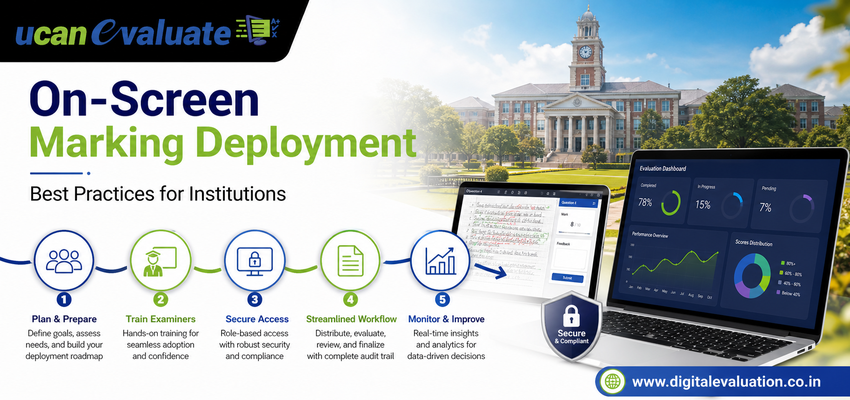
Moving from physical answer-script evaluation to digital marking can dramatically change how an institution manages examinations. But successful deployment is not simply about giving evaluators scanned answer sheets on a computer screen.
A well-planned On Screen Marking System must connect scanning, evaluator allocation, security, monitoring, moderation, marks validation and result processing into one controlled examination workflow.
For universities, autonomous colleges, examination boards and other large assessment bodies, the quality of implementation can determine whether digitalisation actually reduces administrative complexity or simply moves existing problems from paper to software.
That is why institutions considering On Screen Evaluation, On-Screen Evaluation or a broader Digital Evaluation System need a structured deployment strategy.
Here are 10 practical best practices that can make the transition smoother, safer and more scalable.
1. Map Your Existing Examination Workflow Before Digitising It
A common mistake is starting with software configuration before understanding the existing process.
Before deployment, document how answer booklets currently move from examination centres to scanning locations, examiners, moderators and the result-processing team.
Clearly identify:
• Who receives physical answer scripts?
• Who verifies booklet counts?
• Where does Answer booklet scanning happen?
• How are evaluators assigned?
• Who monitors evaluation progress?
• How are marks verified?
• How does approved evaluation data reach the result-processing system?
This exercise helps the institution identify manual dependencies and process gaps before they become digital workflow problems.
The objective should not be to reproduce an inefficient manual process electronically. Instead, institutions should redesign the process around a properly configured On Screen Evaluation System.
2. Make Answer Booklet Scanning the Foundation of Deployment
An evaluator can only mark what they can clearly see.
That makes scanning quality one of the most important components of the entire On-Screen Marking workflow.
Institutions should establish standard operating procedures for booklet preparation, barcode identification, scanning, page verification, image quality and script reconciliation.
A controlled Answer booklet scanning workflow should ensure that:
• Every expected booklet is accounted for.
• Every page is captured.
• Images remain clear and readable.
• Blank pages and supplementary sheets are handled correctly.
• Scripts are associated with the correct examination records.
• Quality checks happen before scripts reach evaluators.
Poor Scanning of Answer Sheets can affect every subsequent stage. Therefore, scanning should never be treated as a simple document-conversion exercise.
It is the digital entry point for the entire evaluation lifecycle.
3. Configure Roles and Permissions Before Going Live
An On-Screen Marking System may involve Controllers of Examinations, administrators, scanning teams, evaluators, head examiners, moderators, reviewers and result-processing personnel.
Not everyone should have access to everything.
Role-based access should be configured according to operational responsibility.
For example:
1. Evaluators should primarily access scripts allocated to them.
2. Moderators may require access to selected evaluated scripts and review tools.
3. Examination administrators need monitoring and allocation controls.
4. Scanning teams should work within scanning and quality-control workflows.
5. Result-processing teams should access approved marks rather than active evaluation data.
This separation strengthens governance while reducing unnecessary exposure of sensitive examination information.
4. Pilot the System Before Institution-Wide Deployment
A large university should avoid making its first live digital evaluation cycle the largest examination cycle of the year.
Instead, conduct a controlled pilot.
Choose a manageable combination of:
• One or two programmes
• A limited number of subjects
• Selected evaluators
• Representative answer-script volumes
• Different question-paper structures
Use the pilot to evaluate scanning accuracy, allocation logic, network performance, evaluator usability, moderation workflows and marks transfer.
The pilot should answer a critical question:
Can the complete examination workflow operate reliably before thousands of scripts enter the system?
Any gaps discovered during the pilot are much easier to resolve than problems discovered during a high-volume live examination.
5. Train Evaluators on the Workflow, Not Just the Interface
Showing an examiner where the marks field is located is not enough.
Evaluator training should cover the complete digital workflow.
Training should explain:
• How allocated scripts are opened
• How answers are navigated
• How marks are entered
• How annotations are used
• How unanswered questions are handled
• How evaluation is saved or submitted
• What happens when a page is unclear
• How exceptions are reported
• How completed scripts move to moderation or approval
Examiners should also understand the difference between conventional marking and On-Screen Marking.
The objective is consistency. Every examiner should understand not only how to use the platform but also how institutional evaluation policies apply inside the digital environment.
6. Define Evaluation Rules Before Scripts Are Allocated
A successful Digital Evaluation project requires academic rules and technology rules to work together.
Before evaluator allocation begins, institutions should define:
• Maximum and minimum marks permitted per question
• Mandatory questions
• Optional-question combinations
• Evaluator workload limits
• Re-evaluation rules
• Moderation criteria
• Script reassignment procedures
• Escalation procedures
• Completion and submission conditions
This allows the On Screen Marking System to support the institution’s examination policy instead of forcing administrators to manage exceptions manually.
The same principle applies when Online Assessment, conventional examinations and digital evaluation operate within a broader examination ecosystem.
7. Integrate Digital Marking With the Wider Examination Lifecycle
On-Screen Marking should not become another isolated application.
The real operational benefits emerge when evaluation connects with other examination processes.
A modern examination environment may include:
1. Pre Examination Processing
Student records, subject mapping, examiner mapping, schedules and question-paper workflows.
2. Question Bank Management
Secure creation, categorisation, review and management of examination questions.
A structured Question Bank Management environment can support the assessment lifecycle before evaluation even begins.
3. Examination Processing
Exam administration, script tracking, scanning, allocation and monitoring.
4. On Screen Evaluation
Digital checking, marking, annotations, review and moderation.
5. Post Examination Processing
Marks validation, tabulation, result preparation, publishing and reporting.
Connecting these stages through a University Examination System can reduce repetitive data movement between disconnected applications.
8. Build Quality Checks Into Every Stage
Digitalisation should improve control—not merely increase speed.
Quality checks should therefore happen throughout the workflow.
During scanning, verify booklet counts and page quality.
During allocation, confirm that the correct scripts reach the correct evaluator group.
During marking, configure validation rules that can identify incomplete evaluation or missing marks.
During moderation, provide authorised users with structured review capabilities.
Before result processing, validate whether scripts have completed the required evaluation and approval stages.
A strong Digital Evaluation System should therefore be designed around checkpoints rather than relying on one final verification step.
9. Monitor Deployment With Real-Time Operational Visibility
Examination administrators need visibility into what is happening during evaluation.
Without monitoring, a digital process can still experience hidden bottlenecks.
Administrators should be able to track questions such as:
• How many scripts have been scanned?
• How many are pending quality checks?
• How many have been allocated?
• How many are under evaluation?
• Which evaluator groups are progressing slowly?
• How many scripts are completed?
• How many require moderation or review?
This visibility allows examination teams to intervene before a small delay affects the final result timeline.
Operational dashboards are therefore not simply reporting features. They are management tools for large-scale On Screen Evaluation System deployment.
10. Plan for Scalability Before the First Major Examination Cycle
An institution may successfully evaluate 5,000 answer scripts during a pilot but eventually need to process several times that volume during semester or annual examinations.
Deployment planning should therefore consider peak load rather than average usage.
Institutions should review:
• Expected answer-script volume
• Number of simultaneous evaluators
• Scanning capacity
• Network reliability
• Storage requirements
• Examiner locations
• Support requirements
• Evaluation deadlines
• Backup and recovery procedures
Scalability is particularly important when the On-Screen Evaluation System, Online Examination System, Online Assessment and result-processing workflows share common infrastructure.
For broader context, Digital Evaluation forms part of the wider educational assessment process, meaning technology should ultimately support the institution’s academic and administrative objectives rather than operate independently from them.
A Practical Deployment Sequence for Educational Institutions
Instead of attempting everything simultaneously, institutions can follow a phased implementation.
Phase 1 – Process Discovery:
Map the existing University Examination System and identify manual dependencies.
Phase 2 – Configuration:
Set up subjects, evaluators, roles, workflows, marking rules and security permissions.
Phase 3 – Scanning Pilot:
Test Scanning of Answer Sheets, barcode mapping, image quality and reconciliation.
Phase 4 – Evaluation Pilot:
Allow a controlled evaluator group to perform On Screen Marking.
Phase 5 – Quality Validation:
Test moderation, mark validation, audit processes and exceptions.
Phase 6 – Integration:
Connect evaluation data with Post Examination Processing and result workflows.
Phase 7 – Scale-Up:
Expand the system across departments, programmes or examination cycles based on pilot findings.
This phased approach allows institutions to identify operational issues early while building confidence among examination administrators and evaluators.
Common Deployment Mistakes Institutions Should Avoid
Even a capable system can underperform when implementation is rushed.
Watch for these common mistakes:
• Mistake 1: Digitising an inefficient manual process without redesigning it.
• Mistake 2: Starting with large examination volumes before conducting a pilot.
• Mistake 3: Ignoring answer booklet scanning quality.
• Mistake 4: Providing software demonstrations instead of structured evaluator training.
• Mistake 5: Giving users excessive system permissions.
• Mistake 6: Treating On-Screen Marking as independent from the wider Examination Processing workflow.
• Mistake 7: Waiting until result compilation to identify missing or incomplete evaluations.
• Mistake 8: Failing to plan capacity for peak examination periods.
Avoiding these issues can make the transition from physical evaluation to Digital Evaluation significantly more controlled.
Why Deployment Strategy Matters as Much as Technology
An On Screen Marking System can remove many physical dependencies associated with conventional answer-script evaluation, but technology alone cannot redesign an examination workflow.
Institutions also need:
• Clearly defined processes
• Accurate Answer Booklet Scanning
• Secure user access
• Trained evaluators
• Standardised marking rules
• Real-time monitoring
• Moderation controls
• Integration with result processing
When these components work together, On-Screen Evaluation becomes part of a much stronger digital examination ecosystem rather than simply an alternative way of viewing answer sheets.
Frequently Asked Questions
What is an On Screen Marking System?
An On Screen Marking System is a digital platform that allows authorised evaluators to assess scanned answer scripts electronically rather than physically handling paper booklets.
Is On-Screen Evaluation the same as an Online Examination System?
No. An Online Examination System generally manages the delivery of examinations digitally, while On-Screen Evaluation focuses on evaluating responses electronically. Paper examinations can also use On-Screen Marking after answer booklets are scanned.
Why is Answer Booklet Scanning important?
Answer Booklet Scanning converts physical scripts into digital images that can be securely allocated to evaluators. Image completeness and readability directly affect the quality of the evaluation workflow.
Can an On Screen Evaluation System support large universities?
Yes, provided the deployment is designed for expected script volumes, concurrent evaluators, scanning capacity, system availability and examination deadlines.
How does Digital Evaluation support Post Examination Processing?
Once marking, moderation and validation are completed, approved marks can move into Post Examination Processing workflows for verification, tabulation, result preparation and publishing.
Conclusion
Successful On Screen Marking System deployment is not defined by how quickly software goes live. It is defined by how effectively the institution redesigns the complete evaluation workflow around it.
Start by understanding the existing process. Standardise Scanning of Answer Sheets. Configure roles carefully. Train evaluators. Pilot before scaling. Establish quality controls. Integrate evaluation with the broader University Examination System and monitor every critical stage.
When implementation receives as much attention as technology, On Screen Evaluation, On-Screen Marking and Digital Evaluation can become powerful components of a faster, more controlled and scalable examination ecosystem.